There is no English-language developer guide to EDINET. The official documentation is a 97-page Japanese PDF. Stack Overflow has maybe three questions about it. The best resources are scattered Qiita posts that assume you already know what a 有価証券報告書 is.
We built Axiora on top of EDINET, so we wrote the guide we wish existed when we started. This is everything a developer needs to know to work with Japanese financial data — whether you use our API or go straight to the source.
What EDINET Is (and Isn't)
EDINET (Electronic Disclosure for Investors' NETwork) is Japan's statutory filing system for corporate securities disclosures. Think of it as Japan's SEC EDGAR — except the API is date-based, the docs are Japanese-only, and the XBRL taxonomy has three accounting standards instead of one.
It's run by the Financial Services Agency (金融庁 / FSA), which is Japan's equivalent of the SEC. Every listed company in Japan — plus investment funds, REITs, and any entity that publicly offers securities — must file through EDINET. That's 4,125+ listed companies, all with machine-readable financial data going back roughly a decade.
The data itself is excellent. The developer experience of getting it out is not.
The Ecosystem: EDINET, TDnet, J-Quants
Japan doesn't have one financial data system. It has three, and they each do different things.
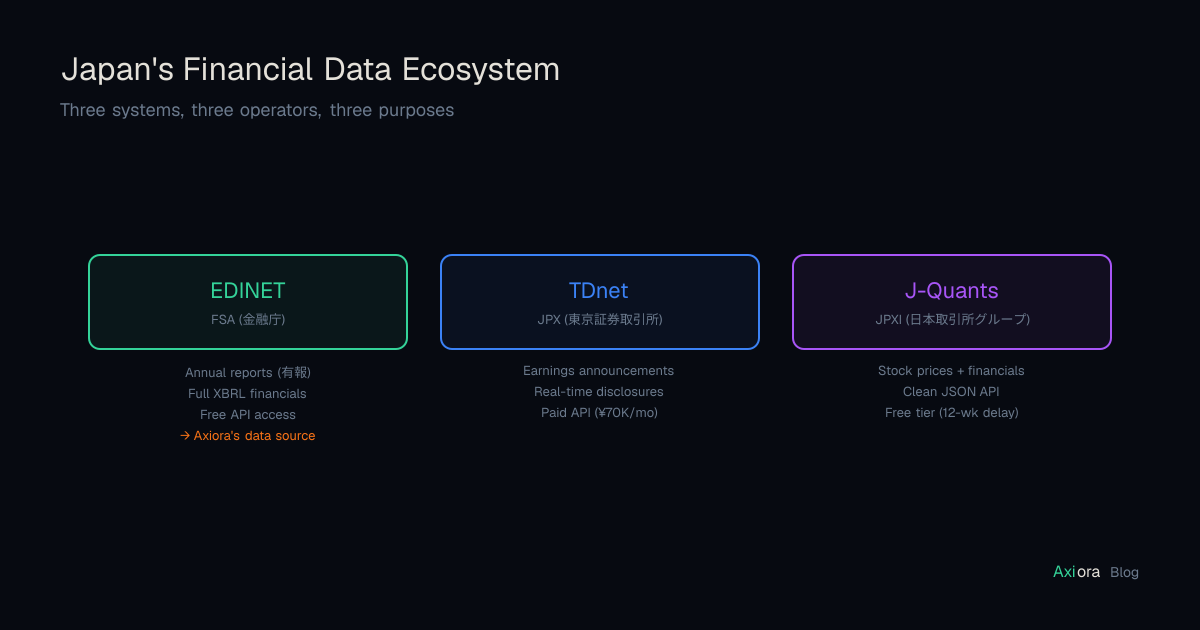
EDINET has the full statutory filings — annual reports (有価証券報告書 / "yuho"), semi-annual reports, registration statements. These are the comprehensive, audited documents with complete financial statements in XBRL. The API is free. The filings show up weeks or months after the fiscal year ends.
TDnet has the real-time stuff — earnings announcements, dividend decisions, M&A notifications. When Toyota reports earnings, TDnet gets it the same afternoon. EDINET gets the detailed statutory filing a month later. TDnet's API costs ¥70,000/month.
J-Quants is JPX's developer-friendly service — stock prices and processed financial data via clean JSON. Free tier with a 12-week data delay; paid plans for real-time. Good for market data, but the underlying financial detail still comes from EDINET filings.
We ingest from EDINET — the primary source of truth for Japanese corporate financials.
What's in a Filing
The Annual Securities Report (yuho) is the flagship document. It's 100-200+ pages and includes everything:
- Business overview — segments, subsidiaries, employees
- MD&A — management's own narrative on the year
- Risk factors — everything the company thinks could go wrong
- Financial statements — the full set: balance sheet, income statement, cash flow, changes in equity — all XBRL-tagged
- Corporate governance — board composition, executive compensation
- Audit report — the independent auditor's signoff
The key fact for developers: every number in the financial statements is encoded in XBRL — an XML standard that tags each value with what it represents, what period it covers, and what currency it's in. This is what makes EDINET data machine-readable. It's also what makes it painful to extract.
The EDINET API
EDINET v2 (launched April 2024) provides free programmatic access to all filings. You get an API key by creating a free account on the EDINET portal — no credit card, no approval process.
Base URL: https://api.edinet-fsa.go.jp/api/v2
curl "https://api.edinet-fsa.go.jp/api/v2/documents.json?date=2026-06-25&type=2" \
  -H "Ocp-Apim-Subscription-Key: YOUR_KEY"
This returns every document filed on June 25th. A typical day during peak filing season returns 100-200+ results:
{
  "metadata": {
    "resultset": { "count": 142 },
    "status": "200"
  },
  "results": [
    {
      "docID": "S100ABCD",
      "edinetCode": "E02144",
      "secCode": "72030",
      "filerName": "トヨタ自動車株式会社",
      "docTypeCode": "120",
      "periodStart": "2024-04-01",
      "periodEnd": "2025-03-31",
      "xbrlFlag": "1"
    }
  ]
}
To download the actual filing: GET /documents/S100ABCD?type=1 returns a ZIP containing the XBRL files.
The Problem Nobody Warns You About
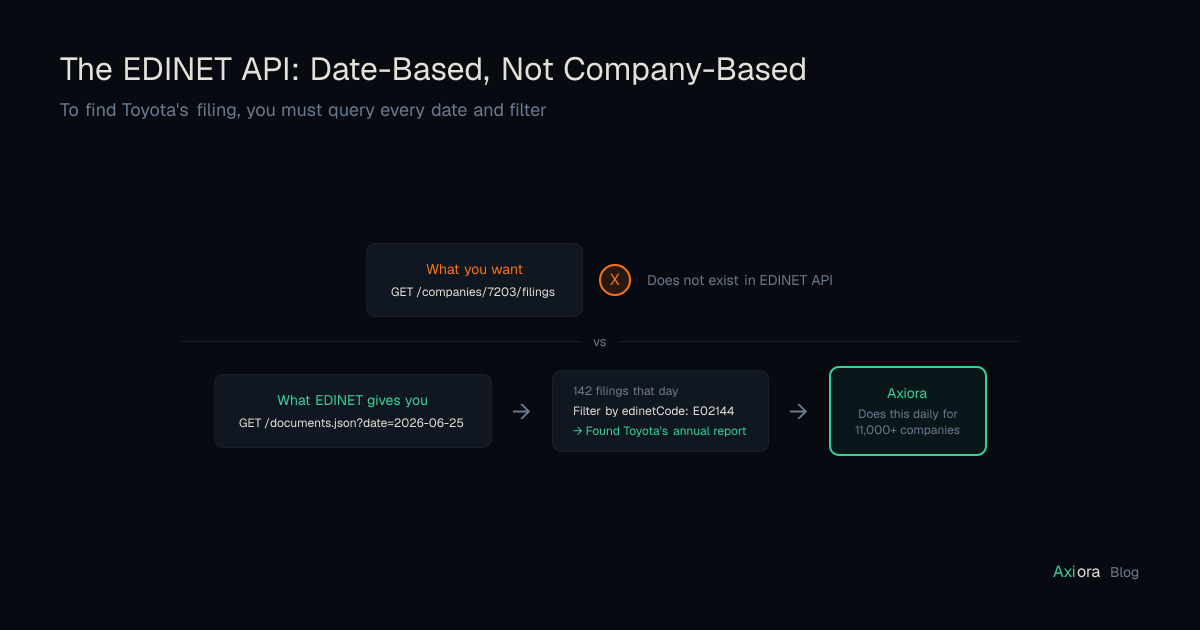
The EDINET API is date-based only. There is no company search. There is no GET /companies/7203/filings endpoint. There is no way to ask "give me all filings by Toyota."
To find Toyota's annual report, you need to:
- Know that Toyota's fiscal year ends in March, so the yuho lands sometime in June
- Query every day in June:
?date=2026-06-01,?date=2026-06-02,?date=2026-06-03… - Scan each day's 100+ results for
edinetCode: "E02144" - Download the matching ZIP
To build a complete database, you iterate over every calendar date and process every filing. For a historical backfill — say, 5 years — that's ~1,800 daily API calls before you've parsed a single byte of XBRL.
We do this automatically, polling every 30 minutes. But if you're going direct, budget for it.
Identifiers: Three Systems, No Translation API
Japan uses three overlapping identifiers for companies. None of them are interchangeable without a lookup table.
| Identifier | Toyota | Who Issues It |
|---|---|---|
| EDINET Code | E02144 | FSA — identifies the filing entity |
| Securities Code | 7203 | JPX — the ticker you see on screens |
| ISIN | JP3633400001 | JASDEC — international standard |
One gotcha: EDINET's secCode field returns 5 digits (72030). The trailing digit is a check digit. The actual ticker is 7203.
There is no API to map between these. You download the EDINET Code List CSV and build the mapping yourself. We maintain this internally and expose both EDINET codes and securities codes in our API.
Why XBRL Parsing Will Ruin Your Weekend
This is the section we wish someone had written for us before we started.
XBRL tags each financial value with a machine-readable element name — a namespace prefix plus a concept name. Find the element, grab the text, done. Right?
No. The element name for "revenue" depends on which accounting standard the company uses, which industry it's in, and which section of the report you're reading. There is no single revenue tag. JP-GAAP manufacturers, JP-GAAP service companies, banks, insurance companies, US-GAAP filers, and IFRS filers all use different element names for what is conceptually the same number.
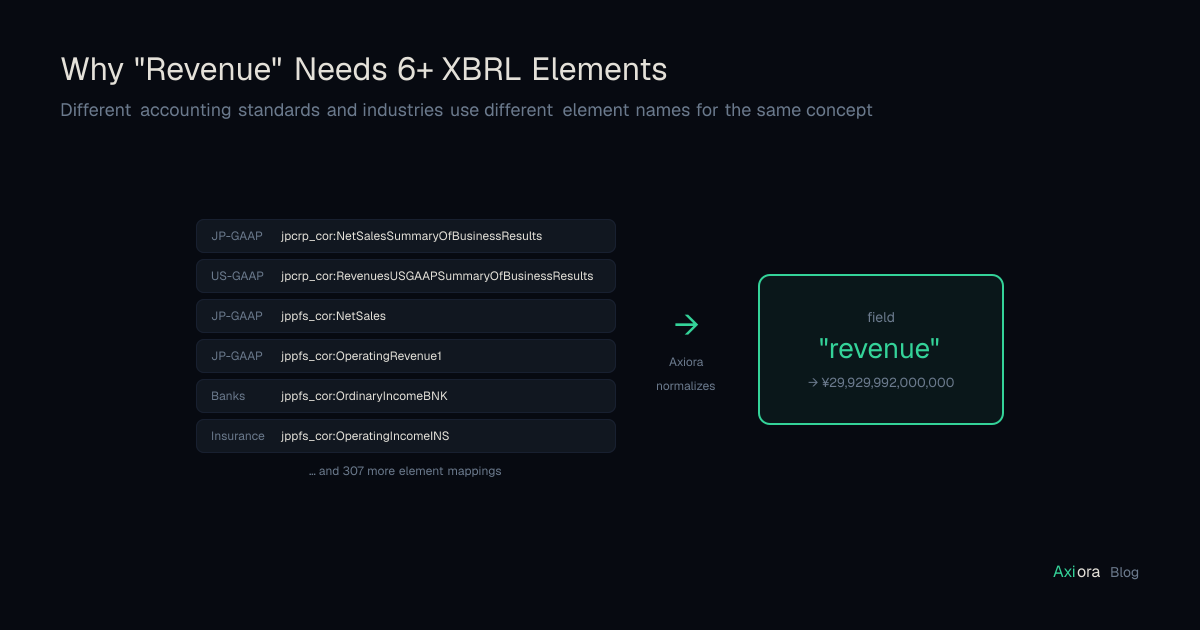
That's 6+ elements for one field. Across all financial metrics, we map hundreds of XBRL elements to 52 normalized fields. The core fields (revenue, net income, total assets, EPS, cash flows) are fully populated; newer fields (gross profit, SGA, inventories, capex, R&D, and others) are currently backfilling across historical filings.
Context: The Silent Bug Factory
Every XBRL value has a contextRef that encodes the reporting period and consolidation status. This is where most parsing bugs live.
A typical filing contains both consolidated and non-consolidated (parent-only) financials. The context IDs look like:
CurrentYearDuration— current year, consolidated, flow itemCurrentYearInstant— balance sheet date, consolidatedCurrentYearInstant_NonConsolidatedMember— parent-only
Parse the wrong context and you get the parent company's revenue instead of the group's. For Japan's largest companies, the difference between parent-only and consolidated group can be tens of trillions of yen. Getting context resolution right requires a priority system that considers period, consolidation scope, and accounting standard simultaneously.
Two Formats, Because Why Not
Older filings use traditional XBRL — pure XML, sometimes 10-50MB. Modern filings use Inline XBRL (iXBRL) — HTML with embedded XBRL tags.
iXBRL has a subtle trap: scaling attributes. The displayed text in the HTML might be 29,929,992, but a scale="6" attribute means you multiply by 10^6 to get the actual value: ¥29,929,992,000,000. Miss that attribute and every number in your database is off by a factor of a million.
~60% of recent filings use iXBRL. Your parser needs to handle both formats.
Encoding and Numeric Surprises
Some older filings use Shift-JIS encoding. Negative numbers show up as △1,234 (Japanese triangle), ▲1,234 (filled triangle), (1,234) (parentheses), or with regular/full-width minus signs. Full-width commas , mix with half-width commas ,. A dash ― might mean zero, null, or "not applicable" depending on which company filed it.
Every one of these conventions exists because some company somewhere actually filed it that way. A government filing system that evolved over 20 years has more edge cases than you'd design from scratch.
The Pipeline
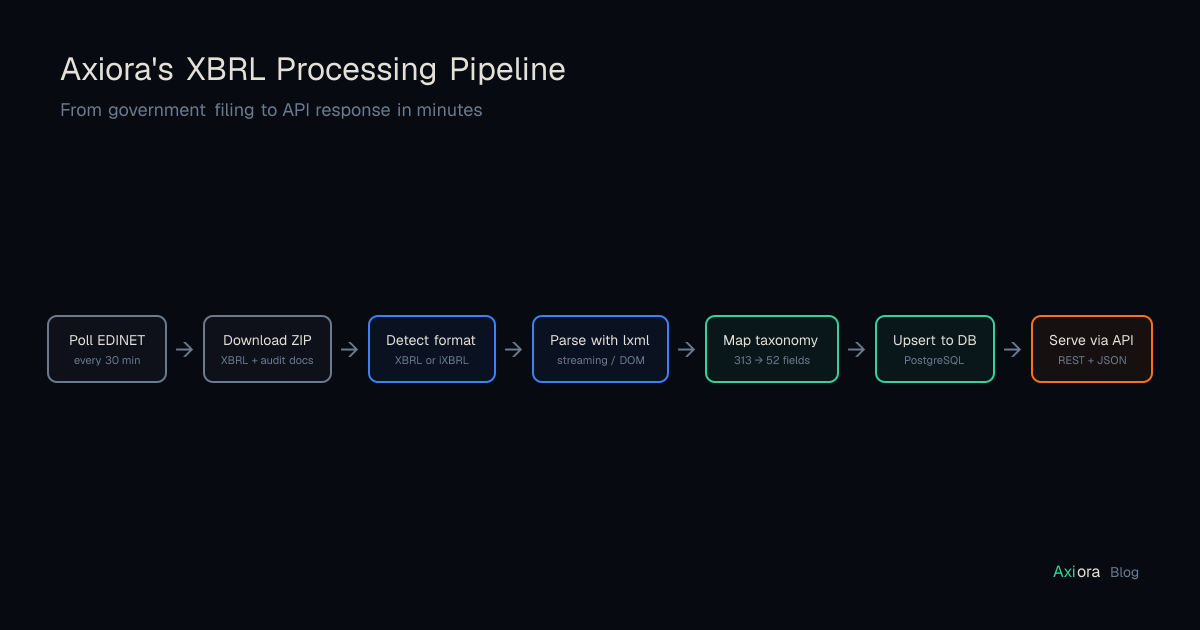
Here's how we turn EDINET filings into API responses:
- Poll EDINET every 30 minutes for new filings
- Download the XBRL ZIP for every annual report
- Detect traditional XBRL vs. iXBRL
- Parse — streaming for large traditional XBRL, full DOM for smaller iXBRL
- Map element names to 52 normalized fields via our taxonomy
- Persist to the database, conflict-resolving on company + fiscal year
- Serve via REST API
The result: what took hundreds of lines of parsing code becomes one API call.
import httpx

resp = httpx.get(
    "https://api.axiora.dev/v1/companies/7203/financials",
    headers={"Authorization": "Bearer ax_live_YOUR_KEY"},
)
data = resp.json()["data"][0]

print(f"Revenue:      ¥{data['revenue']:,}")
print(f"Net income:   ¥{data['net_income']:,}")
print(f"Total assets: ¥{data['total_assets']:,}")
Revenue: ¥29,929,992,000,000
Net income: ¥4,944,933,000,000
Total assets: ¥90,114,296,000,000No XBRL. No ZIP files. No taxonomy mapping. No triangle-symbol-to-negative-integer conversion.
EDINET vs. SEC EDGAR
If you've built on EDGAR before, EDINET will feel like a step back in developer experience.
| EDINET | EDGAR | |
|---|---|---|
| Company search | No | Yes (by name, CIK, ticker) |
| Full-text search | No | Yes |
| Auth | Required (free key) | Not required |
| Docs | 97-page Japanese PDF | Extensive English docs |
| Standards | JP-GAAP + IFRS + US-GAAP | US-GAAP + IFRS |
| Industry elements | Banks, insurance get separate tags | Mostly standardized |
| Data quality | Excellent | Excellent |
The data quality is comparable — both are primary regulatory filings. The difference is entirely in the developer interface. EDGAR was built with developer access in mind. EDINET was built for regulatory compliance, and developer access was bolted on later.
Your Options
Build it yourself. Free, but plan for 2-4 weeks of engineering time before your first clean data point. You'll need to write an XBRL parser for 3 accounting standards and 2 format variants, build a taxonomy mapping for hundreds of elements, handle encoding transcoding and Japanese numeric conventions, poll EDINET daily, and maintain it all as the taxonomy evolves. We did this. It's why we built Axiora — so nobody else has to.
Use the EDINET API directly. Good if you need the raw filings — MD&A text, risk factor narratives, audit opinions. The structured numbers are XBRL; you'll need to parse them.
Use a structured API like Axiora. Same EDINET source data, parsed and normalized. One API call, no XBRL knowledge required.
curl "https://api.axiora.dev/v1/companies/7203/financials?years=3" \
  -H "Authorization: Bearer your-key"
Free tier. No credit card. Get your API key →